On Motivation
One of the youtube channels I’m subscribed to is TED. Lately, I’ve stumbled upon a talk called “What makes us feel good about our work?”. It’s quite interesting because it reflects my experience in VFX.
httpvh://youtu.be/5aH2Ppjpcho
Dan Ariely, a professor of “behavioral economics”, talks about what motivates people to work. While money might be an initial incentive to start working on something, it’s not the reason why people enjoy their work. That enjoyment comes from the feeling that the work you do is meaningful.
Ariely mentions several examples in his talk. In one experiment, test subjects were much more likely to continue working on something mundane when they had to sign their work results and upon handing them in, their supervisor gave the impression that he inspected their work and said thank you.
Other participants, who had their work shredded before their eyes, obviously felt least motivated to continue working on their tasks. The interesting bit, however, was that a third group of subjects who didn’t receive any kind of feedback to their work felt almost as bad as those who saw their work shredded.
Demotivation Hazards
This made me think of VFX. The bigger the show, the longer the chain of command. Leads, supervisors, external supervisors, DOP, director… such a hierarchy easily creates the situations that Ariely mentions in his talk:
- The longer the chain of command (especially once your shot gets delivered to somebody outside your company) the more a single artist becomes an anonymous cog in the machine. He or she’s no longer “signing” a shot. Most artists will never show up in the film’s end credits as well.
- Feedback to your shot by people several levels above you (DOP comes to mind) will usually show up on your screen as a short quip that somebody transcribed from a meeting or cinesync session. There’s no “thank you” and even a positive “keep working” comes across as much more negative than intended.
- Your work gets shredded without notice. Sometimes, the shot you’ve worked on will simply get omitted because the edit was changed or the director doesn’t like the camera angle anymore.
In the TED talk, Ariely also talks about how workers get demotivated by performing work that reminds them of Sisyphus instead of being meaningful. This, of course, also happens in VFX:
- You are requested to revise and improve things in areas that you know will be thrown away (frames that are part of the handles or areas that will get cropped/matted).
- You need to exaggerate a requested change to your shot just so that the DOP or director notices the change. He’ll then tell you to “split the difference” and reduce the effect by 50% but if you had provided that version right away he’d told you he doesn’t see the change he requested.
All of this diminishes the feeling of doing meaningful work and will in time cause frustration. The good news is that I have experienced or heard about ways to prevent situations like that.
Solutions
- At one facility, artists had access to recorded cinesync sessions. It felt like a great way to hear a supervisor’s or DOP’s thoughts about a shot before it gets condensed to “add more flares” in the shot database.
- In an article about Roland Emmerich’s “Anonymous” I’ve read that the director sat down with artists as often as possible. This is of course only possible in rare cases as usually work gets subcontracted around the globe. But if you’re working on smaller projects, local movies or TV commercials this could probably be done a lot more.
- Especially in-house supervisors could review shots directly with at the artist’s desk. Since everybody involved will know that they are looking at a work-in-progress snapshot, mistakes and misunderstanding can be identified early and feedback might not sound as harsh. On the other hand, many programs used in VFX don’t allow for real-time interactivity on screen so reviewing rendered versions is necessary.
- On shows where I was comp lead myself, I tried to use “thanks” or “please” in every artist feedback I typed into the database or an e-mail. I’ve also tried to acknowledge the change that an artist has made especially if the result didn’t meet my expectations yet.
- Personal feedback in dailies instead of e-mails. Intercontinental cinesync sessions outside office hours may make this impossible but at least in-house reviews should be done more personally. It may be true that having the supervisor review shots with a producer “in private” saves a substantial amount of time, but actual dailies and personal feedback might just make work more meaningful.
- Scheduled weeklies with all the artists. Only an appallingly small amount of shows I’ve worked on had actual weeklies where everybody was able to see what was being done by other artists and (even more important) other departments.
Well, there’s certainly more to this. For one, I have no work experience in large companies (100+ artists) on the one hand or vfx sweatshops on the other hand. At the end of his talk, Ariely mentions approaches to work in an industrial society where division of labor was a key factor to mass production vs. a knowledge society where meaningful work might be more important. So watch that vid and if you have any comments feel free to share them below 🙂
My Shot on fxguide
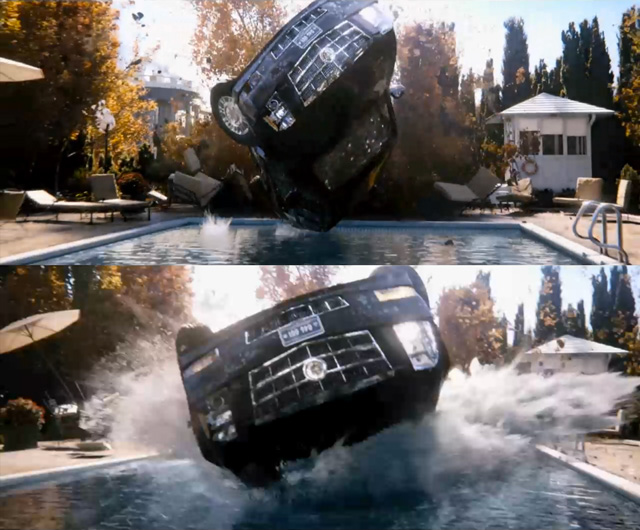
Just found out about an article on fxguide about White House Down. It mentions a full-cg shot I’ve worked on for Scanline Munich. Scroll down to the pool splash shot, of which I had already posted some stills previously.
Also, check out Scanline’s breakdown of the Air Force One explosion at the end of the article!
I’m hotlinking the vid of my shot from fxguide here, don’t know how long that works though…
[flowplayer src=’http://www.fxguide.com/download/?force_file=/2013/07/CHA_182_0020_final_hhd.mp4′ width=640 height=360 splash=’CHA_182_0020_final_hhd.jpg’]
(clip copyright 2013 Sony Pictures)
Fonotune
Fonotune – Teaser from Jon Britt on Vimeo.
Fonotune is a feature film project by Fabian Hübner (read more about it on twitchfilm). I’ve contributed some small VFX and I’ll do a video tutorial on that in the future.
Comp-Fu Answers Part 2
Once again I’ve pulled out keywords from my piwik reports!
graphics to rec709 lut
— anonymous
“Graphics” can mean a dozen things. If you have designed some stuff in Photoshop or taken screenshots, for example, they are probably in sRGB. To convert it in Nuke for a rec709 project, just select sRGB in the read node. This will linearize it and if you put on the rec709 LUT you’ll see that it appears a bit darker than in Photoshop. In Fusion, you can convert the image using the Gamut tool (input sRGB, output ITU-B-R.709, both gamma checkboxes enabled).
in fusion for which reason there is no gamma slider??
— anonymous
That made me laugh. All I could think of is this meme 🙂
I guess you mean the nifty viewer controls that Nuke has? You need to add a viewer LUT for this manually. There’s the GainGamma Fuse that ships with Fusion or my gpu accelerated sRGB/rec709 LUTs.
nuke ramp tutorials
— anonymous
Oh come on. What’s next? A tutorial on how to prepare a peanut butter sandwich?!
how many lens flares in total recall
— anonymous
Well, I didn’t count them when I talked about the movie on my blog. But here’s somebody who did!
Comp-Fu Answers Part 1
Welcome to my new show where I answer questions that are based on google searches that brought users to my website. (disclaimer: I’m using piwik for web site statistics and search keywords are transmitted by the user’s browser. It’s anonymous though, so relax.)
what is color space and color temperature
— anonymous
Thanks for your question, Mr Anonymous. Color Space and Color Temperature can be looked up on Wikipedia. In VFX specifically, the term color space usually means the way that a color is being split into separate channels for digital processing. RGB by default (red, green and blue channels). It can be converted back and forth to spaces like HLS, Lab, YUV and so on where you still have red, green and blue channels but now each channel contains a different color attribute. In HLS, the red channel contains a color’s hue, for example.
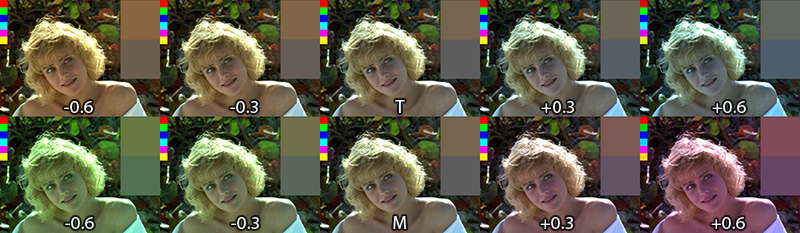
Color temperature is a measure for how cool or warm an image appears (top row of the image). It has a well-defined physical background but basically it’s your white balance setting. It can be adjusted in most RAW converters and although it’s not a color space you can adjust it using the TMI system which includes a magenta-green-value in addition to the orange-blue color temperature axis. It’s available in Shake and Nuke and I’ve made a macro that brings it to Fusion.
color temperature in Nuke
— anonymous
I think there’s no color temperature node in Nuke, but I adjust the temperature of an image using a Gain adjustment:
Open the gain color wheel and enable the TMI sliders if they’re not yet visible. Then, adjust the T slider to your liking. The image might appear brighter or darker now so as a second step, I use the V slider of the HSV group and bring it back to 1.0. This makes sure that the image stays as bright as before (that’s not totally true, but it’s a good rule of thumb. Of course you can tweak every slider to your liking).
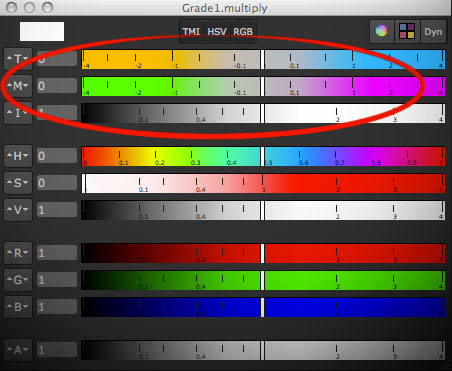
I choose the ColorCorrector instead of Grade or Multiply because it has a saturation slider that is applied before the gain and can be used to make the warm or cold tint of an image stronger (if you desaturate the image completely before tinting you’re doing what Photoshop’s Hue/Saturation adjustment calls colorizing the image).
game of thrones color grading
— anonymous
That’s funny. I’m no authority but a while ago I made a blog post on that topic. And coincidentally it involves color temperature 🙂
Hansel & Gretel: Wife Beaters
The-Editing-Room.com has a humorous script of Hansel & Gretel which I watched recently as well. After being slightly enthusiastic about the trailer’s vfx and steam punk-y flair I gotta say that Hansel & Gretel is an even bigger piece of crap than I had feared.
I can recommend it for people who enjoy watching women being hit into the guts and faces with blunt objects.
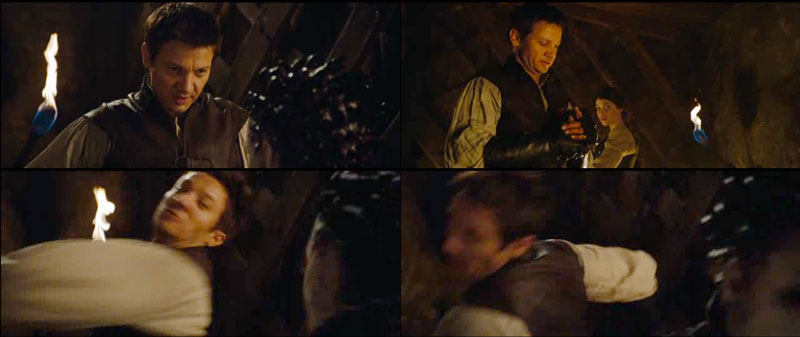
“Believe me, honey, this hurts me more than it hurts you.”

“Hello, I’d like to apply for the position of screenwriter. I have recently divorced my wife and am willing to weave my sick revenge fantasies into the plot…”
I applaud the movie for using make-up effects for witches and trolls, some aerial shots looked like well-done miniatures and a lot of splatter stuff felt like practical SFX as well. I don’t need this to be VFX all the time. Had they been consistent with it, the movie might have been a little gem in an era of CGI.
But towards the end – or rather mere seconds before the credits start rolling – we are treated with some top-notch bullet-time Krakatoa particles full-CG expensive eyecandy which feels awkwardly out of place. After all, the first 99% of the movie’s effects were not much better than what TV shows like Buffy or Grimm are doing. For example, not a single witch-flying-away-on-broom effect looked good.
I don’t really accuse it of weirdly budgeted effects or even plot inconsistencies. Come on, it’s a popcorn fantasy movie. I accuse it of being boring boring boring. That feeling creeps in after just a couple of minutes of watching dialog scenes that consist mostly of awkward silence. It’s like the actors are thinking “I’ve delivered my line, why doesn’t anybody yell “CUT” already?!” and it shows on their faces.
That, and the misogyny.

rating: 3/10 (the “way below expectations” level where it’s in the company of Uwe Boll productions like “BloodRayne” or “Alone in the Dark”)
Trailer Shot
The fruits of my labor (and Jan’s plus of a bunch of other hard-working colleagues in lighting, animation and fx simulation of course).