Reconciling Job and Family
Reconciling a job in the media or vfx industry with a family can be a tough task. I hope more companies follow the lead of Canadian ad agency Union. Once a year, on employee appreciation day, their employees are rewarded for their hard work by being allowed to see their families 🙂
(found via pixelsham)
Ok, that’s a joke. Obviously. But it coincides with another blog post from vfxsoldier about an article in ‘Variety’ where the frustration about the working conditions at MPC boils over in the comments section. The title of that article? Moving Picture Co. Finds Valuing Artists is the Best Effect.
Disclaimer: personally, I can’t judge any of this since I have never worked at MPC nor in the UK for that matter.
The Great Martian War
Man, World War 1 was apparently greater (and more awesome) than I’ve been told in school.
The video above, which seems to be a compilation from a mockumentary on History Channel, is so funny it makes you forget the horrors of WW1 as shown in that real documentary on ARTE (IMDB page – unfortunately there doesn’t seem to be much info in English).
The shot of horses grazing in front of broken Martian machinery reminds me of the art of Simon Stålenhag.
Star Wars Without Music
With all the focus on vfx and pretty visuals you often forget about the importance of music and the trickery that is done with sound effects and sound mixing. Here’s a great clip that re-creates what the final ceremony in the original Star Wars must have sounded like to its participants. No, not the Ewok party. That one:
Check out the Auralnauts channel for more great dubs and movie spoofs. I recommend this fake director’s commentary for After Earth as well as a spoof of Star Wars Episode 2 where Anakin is friendzoned by Padme. It sports dubbed and lip-synced scenes by good voice actors and some original music.
bonus video: Red Letter Media’s take on why the romance of Anakin and Padme in Star Wars is an example of pretty bad screen writing…
MinutePhysics Explains Star Shapes
Most lens flares, especially artificial ones in VFX, have a star-shaped thingy around bright light sources. And every comp software has its own tool for this, whether it’s called glint, glare, highlight and so forth. This video explains the physics behind these star shapes and the correct chromatic aberration if you fake them (spoilers: red is diffracted the most).
With the knowledge from this video, you can make your own star-shaped diffraction patterns using a fourier transformation. Nuke has a tool for this.
The Last Door
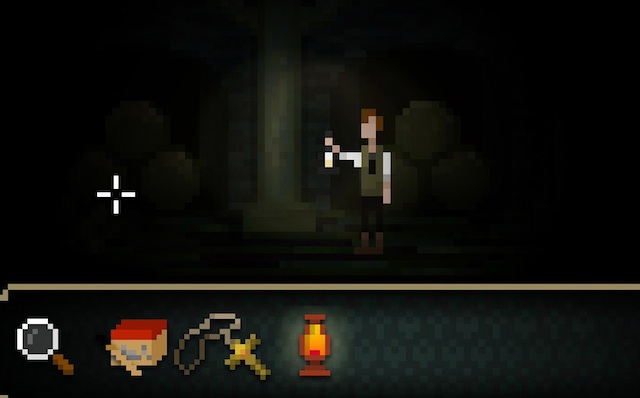
This is a free, crowd-funded point & click adventure with a spooky theme and a reduced visual style. The first three chapters are free, but to continue beyond you need to be a supporter. 5 parts have been programmed so far.
I’ve finished the first 2 chapters and I guess I’ll donate because “The Last Door” has a gripping story. It relies heavily on the eerie atmosphere created by its sound track and the makers of this game suggest headphones and a dark environment.
Give it a try! (free account necessary)
But don’t watch the trailer on their website. It contains spoilers.
Fake Wide Aperture
Took 10 seconds of video with a gentle camera motion, stabilized and averaged 400 frames. If I’ve applied the formula correctly, this should be about f/0.04 (about 100mm diameter for the iPhone’s 3.85mm focal length). But due to rolling shutter and motion blur, the bokeh is ugly.

Fresh ’14: A New Fusion Skin
I’ve written a number of scripts and macros for Fusion, but I’ve never dealt with its theme/skin engine. Since Fusion 7 is about to be released and totally looks like Fusion 6 I’ve drawn a custom skin (or theme) to freshen up the GUI a bit.
updated 2014-11-12: for Blackmagic Fusion 7.5 see paragraph at the end!
Fusion’s skin engine is quite flexible but not everything can be fully themed and customized. I’ve documented the skin file format while building my skin in case other people are interested in delving into this.
So, without further ado, here’s the skin:
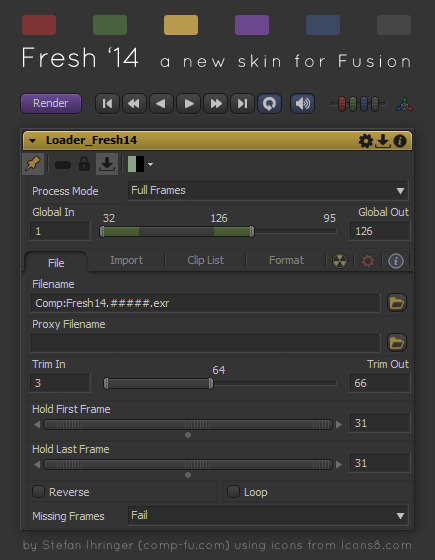
Download Fresh14.fuskin and place it into your Fusion\Skins directory. Then go to Preferences → Global → Appearance and move “Fresh14” from the left list to the right one (below the Fusion 6.1 entry that is already there).
Credits for the icons: http://www.icons8.com
The skin contains:
- new tool controls that change the glossy look with one that is consistent and much flatter but still uses bevels and highlights to indicate widgets that you can push or drag.
- a color scheme that is as desaturated as possible to not be distracting but doesn’t look dull or monochrome.
- consistent icon style, including new ones for the tracker, the file dialog and the main tool bar. Moreover, many icons in Fusion’s default skin had the wrong size and were being scaled down to fit onto buttons. Not anymore.
- wider input fields so decimals don’t get cut off all the time.
- wider margins between certain controls to make the GUI look less cramped.
update 2014-11-12:
Blackmagic Design’s new Fusion 7.5 (free) no longer supports skin preferences. This might hint at a GUI update in the near future but if you want to continue to use Fresh 14 now you need to replace the Fu61.fuskin file in the Fusion\Skins directory manually with a patched version. Read all about it on steakunderwater.com!
