3D Printing for Special Effects
httpvh://www.youtube.com/watch?v=8RQpHzoa4j0
Great insight into how 3D printing is used at Legacy Effects. You should also watch the videos about their Comic Con robot project.
(via pixelsham)
Vertigo
Remember when I posted photos of the Shanghai Financial Center? That iconic skyscraper that looks like a bottle opener:
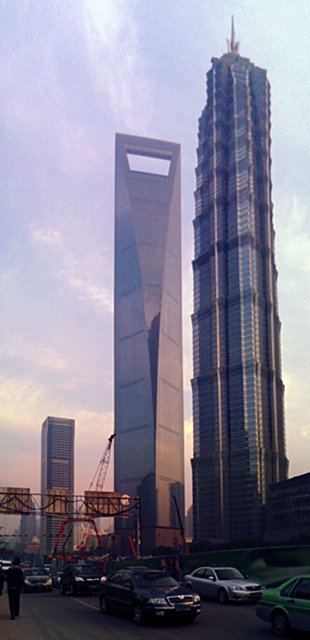
Well, they are building an even bigger skyscraper next to it. When I was in Shanghai it was just an empty construction site. Now it’s almost finished.
And here’s some Russian guys climbing it:

Cerro Torre
A trailer for an upcoming documentary about a young Austrian who free-climbed a mountain that even for alpinists is one of the most challenging ones.
I was involved in creating some computer animations (none of which can be seen in the trailer though). But it’s a great movie and a great story.
httpvh://www.youtube.com/watch?v=ALi267BsNqo
TCL string magic
Here’s another small expression for Nuke. I wanted to burn in a read node’s current frame number using a Text node. It’s easy to get the current image’s source file name from the input’s metadata. But can you extract the frame number from a string like “/server/path/filename.01234.exr”?
Sure! This expression splits the file name into parts separated by the dot character. The 2nd part (index 1 in tcl) is the number we’re looking for:
[lindex [split [metadata input/filename] "."] 1]
A text node with this expression is useful for Hiero burn-ins by the way…

Nuke Python Expression Switch
Nuke’s Python expression syntax can be shorter and more readable than tcl.
Imagine, you want to use a switch to toggle part of your comp on or off on certain frames – maybe to fix artifacts in a 3D pass. Instead of animating a switch’s input or a tool’s mix slider between 0 and 1 you could use an expression:
frame == 1025
This will set the knob to 1 on frame 1025 and to 0 anywhere else. An expression like that also works if you want to enable that knob on several frames, but it gets increasingly unreadable:
frame == 1025 || frame == 1072 || frame == 1074
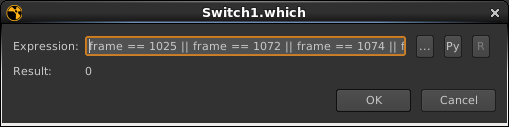
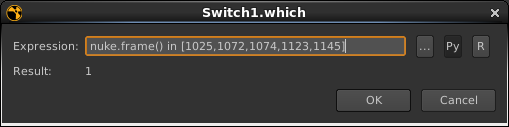
A Python expression is shorter and easier to extend. Enable the Py button in the expression popup and there you go:
nuke.frame() in [1025,1072,1074]
Edit Button
I think this is how directors and producers think postproduction works 🙂
(found via aotg.com)
There’s also version 1.0…
