Fusion / Syntheyes Bridge
A while ago I’ve blogged about the planar tracking features of Syntheyes and I’ve finally made some updates to the Fusion exporter to support them. In addition to that, I’ve played around with the Python support in Syntheyes and I’ve written a script that can create and update (!) a comp in a running Fusion instance. This saves you a lot of hassle if you have tweaked a matchmove or added trackers to a point cloud but you don’t want to export a composition from scratch!
httpvh://www.youtube.com/watch?v=1j6os9nfs0g
The package consists of three scripts: an advanced exporter for Syntheyes, a Python script for Syntheyes that is able to create and update tools from a matchmove (camera, point cloud, planar trackers) and a small tool script for Fusion that sets up a Syntheyes project from a selected Loader. Syntheyes Pro 2013.11 or later required for the Python scripts. Readme included.
The Fusion6 exporter is based on the Fusion5 script that ships with Syntheyes and has been updated in many ways:
- support for stereo camera pairs
- support for planar trackers (with or without planar export preparation script)
- work area (timeline) options as in AfterEffects exporter
- Create locked cameras to prevent their accidental modifications
- Added project info to comp’s comments tab and footage name to camera’s comments
- various fixes like paths and obj meshes
- convert paths to a Windows format when running Syntheyes on Mac/Linux
Download the Syntheyes / Fusion bridge here.
3D Printing for Special Effects
httpvh://www.youtube.com/watch?v=8RQpHzoa4j0
Great insight into how 3D printing is used at Legacy Effects. You should also watch the videos about their Comic Con robot project.
(via pixelsham)
Vertigo
Remember when I posted photos of the Shanghai Financial Center? That iconic skyscraper that looks like a bottle opener:
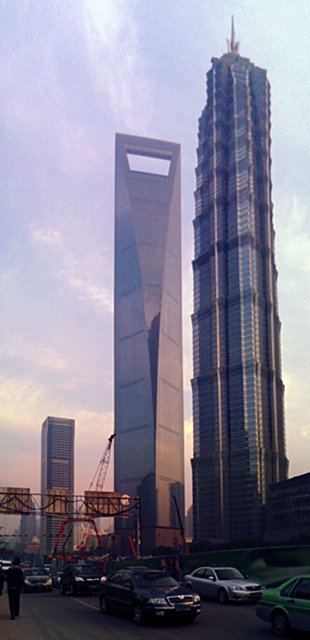
Well, they are building an even bigger skyscraper next to it. When I was in Shanghai it was just an empty construction site. Now it’s almost finished.
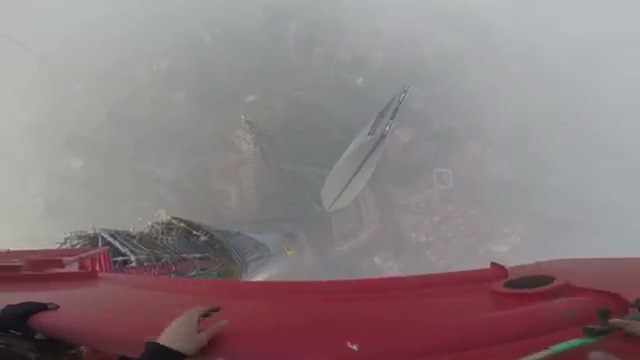
And here’s some Russian guys climbing it:
Cerro Torre
A trailer for an upcoming documentary about a young Austrian who free-climbed a mountain that even for alpinists is one of the most challenging ones.
I was involved in creating some computer animations (none of which can be seen in the trailer though). But it’s a great movie and a great story.
httpvh://www.youtube.com/watch?v=ALi267BsNqo
TCL string magic
Here’s another small expression for Nuke. I wanted to burn in a read node’s current frame number using a Text node. It’s easy to get the current image’s source file name from the input’s metadata. But can you extract the frame number from a string like “/server/path/filename.01234.exr”?
Sure! This expression splits the file name into parts separated by the dot character. The 2nd part (index 1 in tcl) is the number we’re looking for:
[lindex [split [metadata input/filename] "."] 1]
A text node with this expression is useful for Hiero burn-ins by the way…

Nuke Python Expression Switch
Nuke’s Python expression syntax can be shorter and more readable than tcl.
Imagine, you want to use a switch to toggle part of your comp on or off on certain frames – maybe to fix artifacts in a 3D pass. Instead of animating a switch’s input or a tool’s mix slider between 0 and 1 you could use an expression:
frame == 1025
This will set the knob to 1 on frame 1025 and to 0 anywhere else. An expression like that also works if you want to enable that knob on several frames, but it gets increasingly unreadable:
frame == 1025 || frame == 1072 || frame == 1074
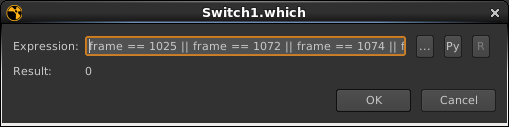
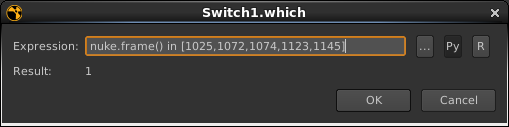
A Python expression is shorter and easier to extend. Enable the Py button in the expression popup and there you go:
nuke.frame() in [1025,1072,1074]