Orange Teal Contrast
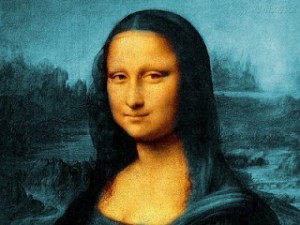 I’ve read an entertaining rant about the apparent overuse of the orange-teal (warm-cold) contrast in contemporary movies. And once your attention has been called to it it’s really kinda impossible not to notice it wherever you look (here’s an overview of movie posters using that particular look).
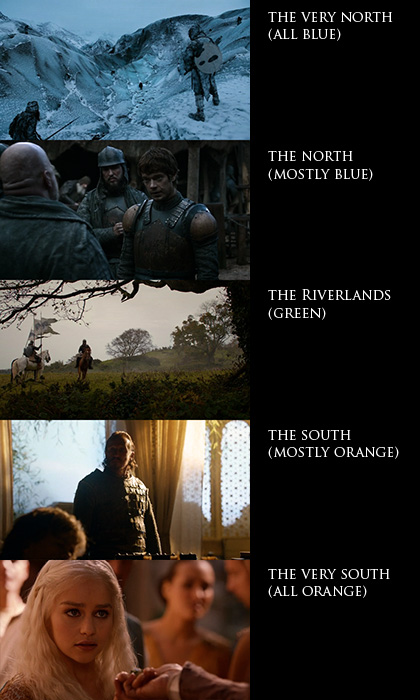 And here are some screen-shots of what is currently my favorite TV show: Game of Thrones. Color temperature serves a clear purpose here. Not only does it give each of the multiple subplots a distinct look, it also serves as a compass as to where on the map the plot is located. Sometimes, however, the orange faces are overdone and make the actors look like Oompa-Loompas. That’s mostly the case in the North where there’s no “natural” orange tones.
Natural, of course, meaning “put there by the props and costumes crew”. Kings Landing, for example, is bathed in orange light but there are still blue hues in the picture (sky, garments and carefully placed specular highlights). In the North, the only natural warm tones are candles so the faces sometimes seem to have been graded towards orange a little bit too eagerly.
Once you pay attention to light and colors in Game of Thrones, you quickly notice what an awesome job the people involved have been doing. A lot of the show’s high production value stems from the fact that the images look gorgeous throughout each episode. Interior scenes are made to look like they are lit by natural light only which bathes most of the rooms in darkness and helps sell a realistic medieval setting. Color and light also promote specific attributes like poverty/toughness or wealth/decadence: southern cities, it seems, have been blessed by an abundance of sunlight which pushed culture, arts and architecture forward while the northerners seem to fight against mother nature’s cold shoulder each day of their life.
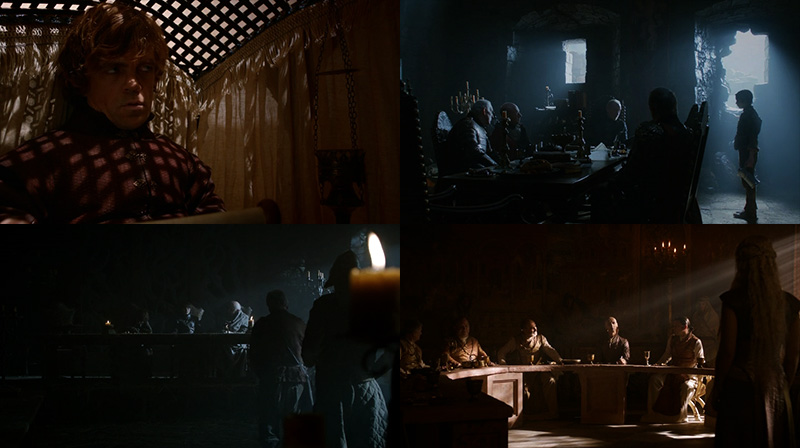
You just can’t imagine portraying the north as a magic-hour landscape while the south is lit by a harsh blue light. Here are some more screengrabs of contrasty, low-key interior scenes:
TMI Color Temperature Correction
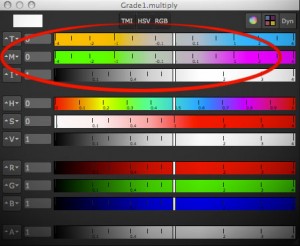 One of the things that I miss in Fusion whenever I have been using Nuke is a way to adjust colors using color temperature. Yes, there’s a white balance tool, but it’s a bit of a black box and it doesn’t have the kind of sliders known from Nuke (or even Photoshop’s RAW converter). I think Fusion’s tool is pretty accurate in terms of color science, but for eyeballing adjustments or creative tinting the other programs’ sliders are more useful.
Nuke provides the TMI system in its color picker so you can use it anywhere you see a color swatch. One parameter adjusts the color temperature by moving red and blue in different directions (you don’t have to specify a proper temperature like 5300K). The second parameter is a shift along the magenta/green axis.
Here’s a macro which allows you to tint an image using this system in Fusion. I don’t know if the formulas I’ve reverse-engineered are only used in Nuke or if there’s a standard for TMI (it’s kinda hard to find information about it). It goes without saying though that all of this is only valid in a linear color space. Reportedly it was also useful to cancel the effect of the ARRI Alexa’s white balance and CC Shift settings.
update August 2013:
I’m getting a bunch of Google hits for the TMI system, although I haven’t spelled out the formulas I’ve used for my macro. Here they are (as used by Nuke’s color picker)…
Color Temperature (T):
Red Gain = 1 – T/2, Blue Gain = 1 + T/2
Magenta/Green (M):
Red Gain = 1 + M/3, Green Gain = 1 – M*2/3, Blue Gain = 1 + M/3
Intensity (I):
RGB Gain = 1.0 + Intensity
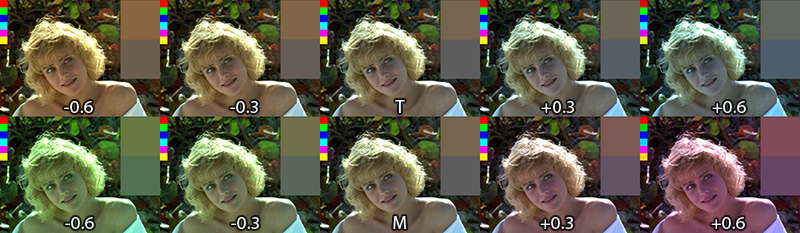
Download the macro here or view the help page on vfxpedia.
VFX Breakdown Effect (Breakdown)
I was pointed to an effects reel for “Wrath of the Titans” by Method Studios (you need to watch it on YouTube due to the usual licensing issues):
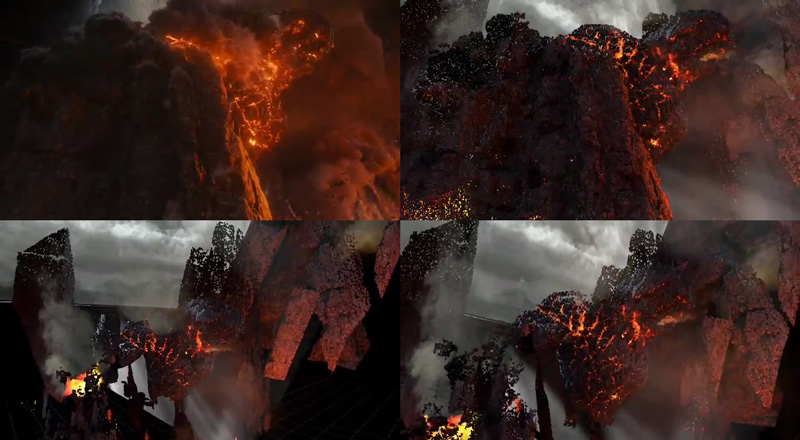
Stills from a vfx breakdown by Method Studios (not my work)
The shots look cool, but what was more interesting is the way they did the breakdown of their CG elements. Look at the camera moves at 0:14 or 1:17.
I’ve tried to dissect their technique using a Fusion comp and some random model I’ve downloaded from turbosquid (so don’t tell me it doesn’t look as cool as Kronos in the video above). The way I think this was done was by projecting the rendered passes back onto either real geometry or a recreation of the geometry using a world position pass. The latter is the only feasible solution for scenes with a high polygon count and can also be done as a particle cloud (see the “dissolving” rocks in the stills above).
Then, additional footage is brought in on image planes. Whether the footage was a 2D matte painting to begin with or a CG element doesn’t matter, for the breakdown it’s all treated like a 2D element. You can see this on the flat volumetric godrays.
To spice it up even more, they probably rendered additional passes especially for the breakdown (for example the wireframe pass) using the camera move designed for the breakdown shot. At this point you could also re-render your scene’s FX passes using the new camera move and treat the breakdown shot as if it was an original shot 🙂 Depends on how much work you wanna put into it.
Here’s a quick video that puts all the techniques together: particle cloud, projections, image planes and wireframe pass.
Mosaic Effect in Fusion
I’ve recorded another video tutorial for your viewing pleasure. It’s just a tiny effect, but the video shows that you can take even little tasks like this a bit further.
httpvh://www.youtube.com/watch?v=NL99jnhOzWk
Rocket Launch Reference Footage
This is an awesome video about an impressive feat of engineering. But I don’t just love the video and it’s voiceover from a technology-geek point of view. It’s also a great reference footage for rocket exhaust and the mayhem it causes. I would love to see more science-fiction authors take this into account when they allow space ships to launch and land as effortlessly as a taxi pulling up.
Watch it full-screen and turn on HD 720p!
Here’s another one: The sound track of a ride on a space shuttle booster rocket from its launch to its impact in the ocean.
Thanks to my colleague who showed me the aptly-named tumblr page FUCK YEAH SPACE EXPLORATION 🙂
Correcting Rolling Shutter in Fusion
eyeon has recently released its Dimension optical flow and stereo disparity toolset. I didn’t have a chance to test the stereo part yet, but since you can now calculate nice and crisp motion vectors, I’ve written a Fuse that can correct rolling shutter artifacts. Here’s a quick demo video:
You can get real-time performance on your GPU using OpenCL and as usual I’ve licensed my source code BSD-style if you want to tinker with it.
I haven’t had enough footage from different cameras to test the plugin thoroughly (just my iPhone and a Canon 5D Mark II). I also haven’t tested any other motion vector generators except for Dimension. Maybe Twixtor works as well, we’ll see…
Updated 2012-10-09: supports the rolling shutter method used by Syntheyes (center scanline is fixed)
 Download the plugin here: RollingShutter_v1_6.Fuse or head over to Vfxpedia.
Photo credits for icon: CC-BY Nayu Kim
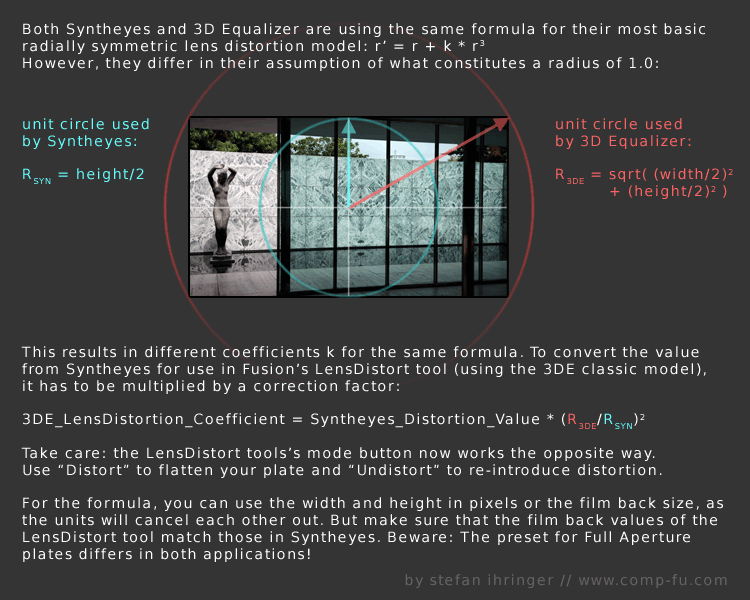
Syntheyes Lens Distortion to 3DEqualizer
I’ve crunched a few numbers yesterday and I think I came up with a solution to convert the lens distortion coefficient calculated by Syntheyes to the one used by 3DEqualizer.
This is necessary since up until now, Fusion’s native LensDistort tool only supports the latter. Unfortunately, only the first coefficient can be used since 3DEqualizer’s formula differs for the higher order coefficient. You can download a tool script that does the calculations for you here:
Here’s the math behind: